Rapid7 InsightVM
→ AWS Security Hub
A serverless, API-driven integration that synchronizes vulnerability findings from Rapid7 InsightVM into AWS Security Hub — enabling centralized SOC visibility with zero infrastructure changes.
Project Overview
Centralized Vulnerability Visibility
This integration bridges Rapid7 InsightVM and AWS Security Hub, allowing SOC analysts to view vulnerability findings alongside GuardDuty threats and AWS Config compliance issues — all in a single unified dashboard.
The solution is fully serverless and agentless. An AWS Lambda function (Python 3.13) fetches vulnerability data from the Rapid7 API, transforms it into the AWS Security Finding Format (ASFF), and pushes it into Security Hub via the BatchImportFindings API.
Security Hub was deliberately enabled via CLI (not the console GUI) to bypass the automatic AWS Config enablement — avoiding unnecessary cost while retaining all the finding aggregation capabilities needed for this integration.
Business Value
System Architecture
How It Works
A simple, three-component serverless pipeline. EventBridge schedules the sync, Lambda orchestrates the data flow, and Security Hub aggregates the findings.
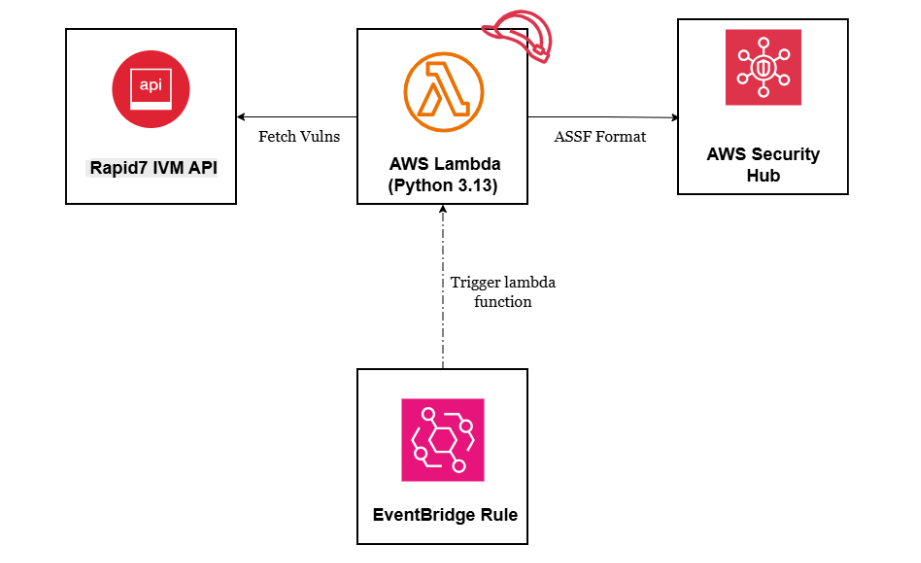
Integration Flow — Step by Step
EventBridge rule fires every hour — no manual intervention, continuous synchronization.
Lambda authenticates with Rapid7 API key and fetches the latest vulnerability data in JSON (100 records, 10 unique CVEs).
Lambda deduplicates records and maps Rapid7 format → AWS Security Finding Format, including CVSS scores and severity normalization.
BatchImportFindings API pushes up to 100 findings per batch. Findings appear in the Security Hub console within seconds.
Data Transformation
Rapid7 Format → ASFF
Lambda translates Rapid7's proprietary JSON format into the AWS Security Finding Format, normalizing severity and enriching findings with CVE and CVSS context.
{
  "id": "wordpress-plugin-cve-2024-13555",
  "title": "WordPress Plugin: CVE-2024-13555: CSRF",
  "severity": "severe",
  "cvss_v3_score": 5.3,
  "cves": "CVE-2024-13555",
  "description": "Vulnerability description...",
  "published": "2025-02-17T00:00:00Z"
}
{
  "SchemaVersion": "2018-10-08",
  "Id": "us-east-1/.../rapid7/wordpress-...",
  "GeneratorId": "rapid7-insightvm-integration",
  "Types": ["Software and Configuration Checks/..."],
  "Severity": {
    "Label": "HIGH",
    "Normalized": 70,
    "Product": 5.3
  },
  "Vulnerabilities": [{
    "Id": "CVE-2024-13555",
    "Cvss": [{ "BaseScore": 5.3 }]
  }]
}
Technical Implementation
Components & Configuration
| Component | Technology | Purpose | Key Detail |
|---|---|---|---|
| Rapid7 InsightVM | SaaS API | Source of vulnerability data | REST API · JSON response |
| AWS Lambda | Python 3.13 | Data transformation & orchestration | 512 MB · 15 min timeout |
| AWS Security Hub | AWS Service | Centralized findings dashboard | Enabled via CLI (not GUI) |
| EventBridge Rule | AWS Service | Scheduled execution | rate(1 hour) · Scheduled Standard |
| IAM Role | AWS Service | Lambda permissions (least privilege) | BatchImportFindings + BatchUpdateFindings only |
| CloudWatch Logs | AWS Service | Operational logging & monitoring | Retention: Never Expire |
- Name: Rapid7ToSecurityHubSync
- Runtime: Python 3.13 · 512 MB memory
- Timeout: 15 minutes
- Handler: lambda_function.lambda_handler
- Environment vars: AWS_ACCOUNT_ID, RAPID7_API_KEY, RAPID7_REGION, PAGE_SIZE
- Role: Rapid7SecurityHubIntegrationRole
- Action: securityhub:BatchImportFindings
- Action: securityhub:BatchUpdateFindings
- Resource: * (Security Hub scope)
- Follows AWS least-privilege security best practices
- Rule: rapid7-cspm-scheduler
- Schedule: rate(1 hour)
- Target: Lambda rapid7-securityhub-integration
- Type: Scheduled Standard
- Status: Enabled · default event bus
Findings Distribution
Severity Mapping & Results
Security Hub currently shows 20 findings instead of 10 unique vulnerabilities. Finding IDs changed during the testing phase, causing Security Hub to create new findings instead of updating existing ones.
When finding IDs change, Security Hub treats them as new findings rather than updates to existing records. This is a platform behavior — not a code defect.
Cosmetic only — does not affect functionality or data accuracy. When original vulnerabilities are remediated in Rapid7, the redundant findings will be updated accordingly through the next sync cycle.
Deployment
Deployment Checklist
Reproducible steps for deploying this integration to any new AWS environment or region.